Developer Reference
A comprehensive guide for developers who want to contribute to Twin4Build. This guide will help you understand the codebase structure, development workflow, and how to contribute effectively.
Architecture Overview
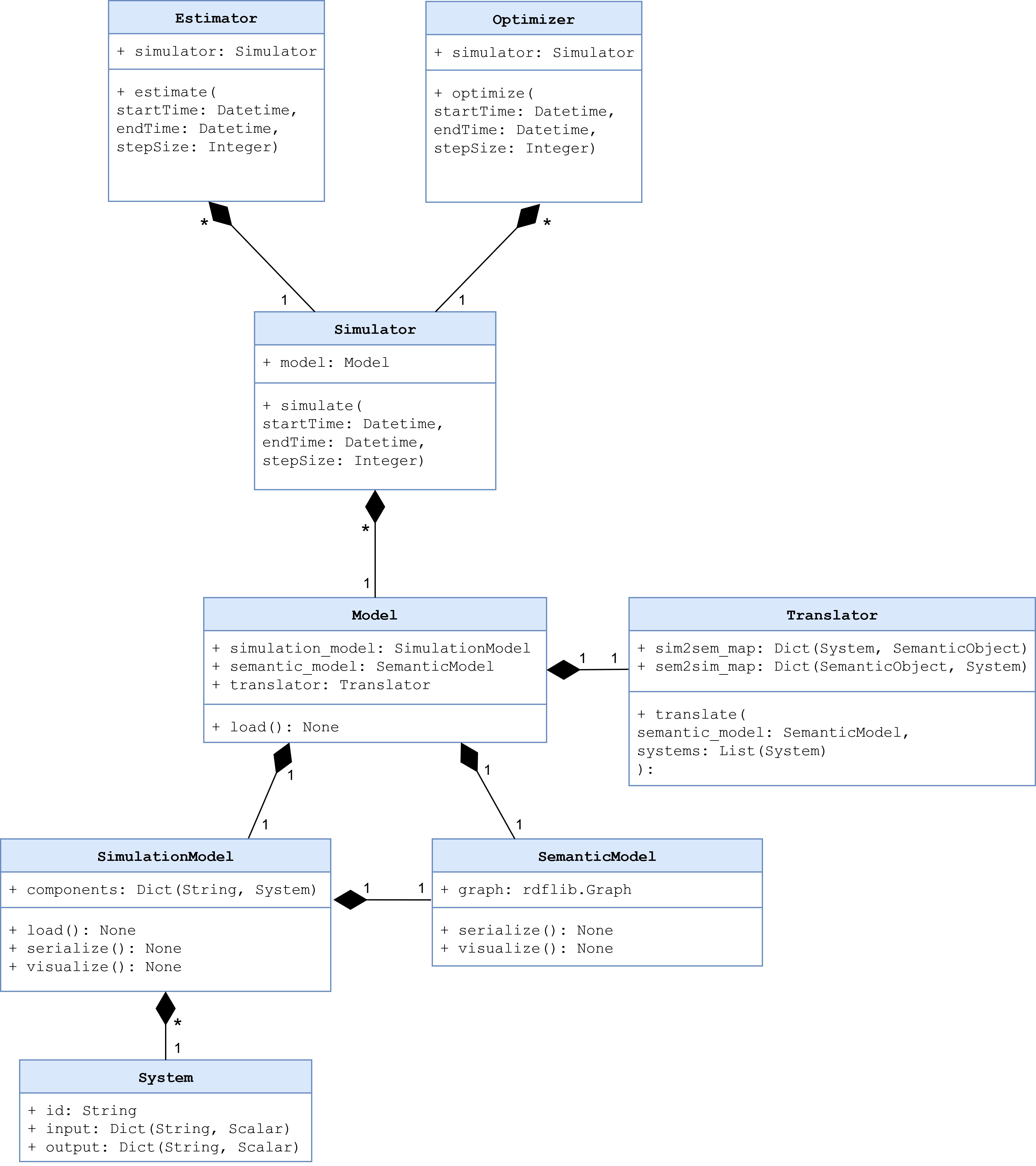
Core Components
Twin4Build is organized around five main components which are exposed through the main module:
Model: Container for building systems, components, and connections
Simulator: Handles time-based simulations and time stepping
Translator: Generates models from semantic descriptions
Estimator: Performs parameter estimation and calibration
Optimizer: Optimizes building operation and control
Package Structure
twin4build/
├── core/           # Core functionality and base classes
├── model/          # Model components and building systems
├── simulator/      # Simulation engine and time stepping
├── translator/     # Semantic model translation
├── estimator/      # Parameter estimation and calibration
├── optimizer/      # Optimization algorithms
├── systems/        # Building system components
├── utils/          # Utility functions and helpers
├── examples/       # Example notebooks and scripts
└── tests/          # Test suite
Development Environment Setup
Prerequisites
Python 3.9 or higher (3.12 recommended)
Git
A code editor (VS Code, PyCharm, etc.)
Conda (recommended) or any Python environment manager
Quick Start: Use the automated setup script python scripts/setup_dev.py after cloning the repository for the fastest setup experience.
Installation from Source
Automated Setup (Recommended)
The easiest way to set up your development environment is using the provided setup script:
# Clone the repository
git clone https://github.com/JBjoernskov/Twin4Build.git
cd Twin4Build

# Run the automated setup script
python scripts/setup_dev.py

# Or with custom options
python scripts/setup_dev.py --python 3.12 --env t4bdev
What the setup script does:
Creates a conda environment with your specified Python version (default: 3.12)
Installs Twin4Build in development mode with all dependencies
Runs the test suite to verify installation
Provides clear next steps and available tools
Script options:
--python VERSION: Specify Python version (e.g., 3.9, 3.10, 3.11, 3.12)--env NAME: Specify conda environment name (default: t4bdev)--help: Show all available options
Manual Setup (Alternative)
If you prefer to set up manually or need a different environment manager:
# Clone the repository
git clone https://github.com/JBjoernskov/Twin4Build.git
cd Twin4Build

# Create conda environment
conda create -n t4bdev python=3.12
conda activate t4bdev

# Install in development mode with dependencies
pip install -e .[dev]
Alternative environment managers: You can also use venv, virtualenv, poetry, or pipenv - just ensure you have an isolated Python 3.9+ environment.
Code Style and Conventions
Python Style Guide
Follow PEP 8 style guidelines
Use type hints for function parameters and return values
Keep line length under 88 characters (Black formatter default)
Use meaningful variable and function names
Naming Conventions
Classes: PascalCase (e.g., Model, SpaceHeaterSystem)
Functions and variables: snake_case (e.g., run_simulation, temperature_data)
Module-level constants: UPPER_SNAKE_CASE (e.g., DEFAULT_TIMESTEP)
Private methods: prefix with underscore (e.g., _internal_calculation)
Private attributes: prefix with underscore (e.g., _components)
Keys used in System.input and System.output dictionaries: camelCase (e.g., indoorTemperature, co2Concentration)
Docstring Standards
Use Google-style docstrings and type hints:
def calculate_energy_consumption(self, temperature: float, duration: float) -> float:
    """Calculate energy consumption for a given temperature and duration.

    Args:
        temperature: The target temperature in Celsius
        duration: The duration in hours

    Returns:
        Energy consumption in kWh

    Raises:
        ValueError: If temperature is outside valid range
    """
    pass
For class properties, use the @property decorator:
class MyClass:
    @property
    def property_name(self) -> float:
        """Description of the property."""
Development Workflow
Git Workflow
Create a feature branch from main:
git checkout -b feature/your-feature-name
Make your changes and commit with descriptive message using imperative mood:
git commit -m "Add new HVAC component for variable air volume systems"
Push your branch and create a pull request:
git push origin feature/your-feature-name
Branch Naming Conventions
feature/description: New features
bugfix/description: Bug fixes
docs/description: Documentation updates
test/description: Test additions or improvements
refactor/description: Code refactoring
Pull Request Process
Run code validation: python scripts/validate_code.py
Update documentation if needed
Add tests for new functionality
Add examples if applicable
Request review from maintainers
Testing
Running Tests
Run the test suite using unittest:
python -m unittest discover twin4build/tests/
Run specific test files:
python -m unittest twin4build.tests.test_examples
Run with coverage:
coverage run -m unittest discover twin4build/tests/
coverage report
coverage html  # Generate HTML coverage report
Code Quality Validation
Before committing code, run the validation script to ensure your code meets Twin4Build standards:
Check code quality (recommended before every commit):
python scripts/validate_code.py
Auto-fix formatting issues:
python scripts/validate_code.py --fix
Include test suite in validation:
python scripts/validate_code.py --test
Combine options (fix issues and run tests):
python scripts/validate_code.py --fix --test
What the validation script checks:
Code formatting (Black): Ensures consistent code style
Import sorting (isort): Organizes import statements
Code style (flake8): Checks for style violations, syntax errors, unused variables, etc.
File issues: Trailing whitespace, missing newlines, etc.
Tests: Runs the full test suite
Manual tool usage (if needed):
# Format code
black .

# Sort imports (uses pyproject.toml config)
isort .

# Check style (uses .flake8 config)
flake8 .
Writing Tests
Place tests in the twin4build/tests/ directory
Use descriptive test names starting with test_
Test both success and failure cases
Use setUp and tearDown methods for common setup
Example test structure:
import unittest
from twin4build import Model

class TestModel(unittest.TestCase):
    """Test cases for the Model class."""

    def setUp(self):
        """Set up test fixtures before each test method."""
        self.model = Model(id="test_model")

    def test_model_creation(self):
        """Test that a model can be created with basic parameters."""
        self.assertEqual(self.model.id, "test_model")
        self.assertEqual(self.model.components, [])

    def tearDown(self):
        """Clean up after each test method."""
        pass

if __name__ == '__main__':
    unittest.main()
Test Organization
Organize tests using unittest’s test discovery patterns:
Test files: Named test_*.py
Test classes: Inherit from unittest.TestCase
Test methods: Start with test_
Advanced Testing Features
Use unittest’s advanced features for better testing:
class TestAdvanced(unittest.TestCase):

    @unittest.skipIf(condition, "reason")
    def test_conditional_skip(self):
        """Skip test based on condition."""
        pass

    @unittest.expectedFailure
    def test_known_failure(self):
        """Mark test as expected to fail."""
        pass

    def test_with_subtest(self):
        """Use subtests for parameterized testing."""
        test_cases = [1, 2, 3, 4]
        for case in test_cases:
            with self.subTest(case=case):
                self.assertTrue(case > 0)
Documentation
Building Documentation
Twin4Build uses Sphinx for documentation generation. The documentation build process requires two steps:
Step 1: Generate API Documentation
This step auto-generates API documentation from your Python docstrings:
cd docs

# On Windows:
.\make buildapi

# On Linux/Mac:
make buildapi
Step 2: Build HTML Documentation
This step compiles all documentation (manual + API) into HTML:
# On Windows:
.\make html

# On Linux/Mac:
make html
- buildapi:
Scans your Python code for docstrings
Generates .rst files in source/auto/
Creates API reference documentation
Runs cleanup scripts
html: - Compiles all .rst files (manual + auto-generated) - Applies Sphinx theme - Generates final HTML documentation - Creates cross-references and search index
View Documentation
For viewing and browsing the documentation, open the Twin4Build/build/html/index.html file in your browser.
Documentation Standards
Keep documentation up to date with code changes
Include code examples for all public APIs
Use clear, concise language
Include diagrams and visual aids when helpful
Follow reStructuredText formatting for manual pages
Writing Documentation
Manual Documentation: Edit files in docs/source/manual/
API Documentation: Add docstrings to your Python code:
def calculate_energy(temperature: float, duration: float) -> float:
    """Calculate energy consumption for given conditions.

    This function computes energy usage based on temperature
    and duration parameters for building simulation.

    Args:
        temperature: Target temperature in Celsius
        duration: Time duration in hours

    Returns:
        Energy consumption in kWh

    Example:
        >>> energy = calculate_energy(22.0, 8.0)
        >>> print(f"Energy used: {energy} kWh")
        Energy used: 24.5 kWh
    """
    return temperature * duration * 1.2
Troubleshooting Documentation Build
Common Issues:
Sphinx not found: Install dev dependencies with pip install -e .[dev]
Import errors in API docs: Ensure Twin4Build is installed in development mode
Missing modules: Check that all dependencies are installed
Build fails: Try cleaning first: delete docs/build/ and docs/source/auto/ directories
Clean Build:
# Remove generated files and rebuild
cd docs
rm -rf build/ source/auto/  # Linux/Mac
rmdir /s build source\auto  # Windows

# Then rebuild
make buildapi && make html  # Linux/Mac
.\make buildapi && .\make html  # Windows
Creating Examples
Use Jupyter notebooks for examples
Place examples in twin4build/examples/
Include both basic and advanced use cases
Ensure examples are self-contained and runnable
After adding an example, also add it to the test suite: twin4build/tests/test_examples.py
Contributing Guidelines
Reporting Bugs
Provide python version and operating system
Twin4Build version
Minimal code example to reproduce the issue
Expected vs. actual behavior
Error messages and stack traces
Suggesting Features
Describe the use case and motivation
Provide examples of how the feature would be used
Consider implementation complexity
Discuss potential impacts on existing functionality
Code Contribution Process
Fork the repository on GitHub
Create a feature branch following naming conventions
Make your changes following code style guidelines
Add examples (optional) for new functionality
Add tests for new functionality
Update documentation as needed
Run the test suite to ensure everything works
Submit a pull request with a clear description
Advanced Topics
Extending the Package
Creating Custom Components
To create a custom component:
Inherit from
Systemand eitherModuleorFMUSystemImplement required methods
Add proper type hints and documentation
Include tests for your component
Example:
class CustomHVACComponent(System):
    """Custom HVAC component for specific use case."""

    def __init__(self, **kwargs):
        super().__init__(**kwargs)
        # Initialize component-specific attributes

    def initialize(self, start_time=None, end_time=None, step_size=None, simulator=None):
        super().__init__(**kwargs)
        # Initialize component-specific attributes

    def do_step(self, secondTime, dateTime, step_size, stepIndex):
        """Perform one simulation step."""
        # Implement simulation logic
        pass
Performance Considerations
Always use torch operations on
Use vectorized operations when possible
Profile code to identify bottlenecks
Consider using NumPy for numerical computations
Optimize simulation loops for large models
Debugging Tips
Use logging for debugging information
Set breakpoints in your IDE
Use pdb for interactive debugging
Check component connections and data flow
Release Process
Version Management
Follow semantic versioning (MAJOR.MINOR.PATCH)
Update version in pyproject.toml
Create release notes for significant changes
Tag releases in Git
Building and Distributing
Update version number
Run full test suite
Build documentation
Create distribution:
python -m build
Upload to PyPI (maintainers only)
Getting Help
GitHub Issues: For bug reports and feature requests
Documentation: Check the online docs first
Examples: Review the example notebooks
Code: Examine the source code and tests
Contact Information
Maintainer: Jakob Bjørnskov (jabj@mmmi.sdu.dk)
Documentation: https://twin4build.readthedocs.io/